Embed an Instagram feed in WordPress without touching a line of code
Install our free plugin, drop in a shortcode, and your Instagram content instantly goes live on your WordPress site.
Trusted by 100,000s of businesses around the globe.
" height="23.34900000092387px" id="fz0ZYDtIb" width="86.99900073242188px"/></svg>)
" height="36.344px" id="Sagz4Rkec" width="36.34400000000001px"/><g d="M 7.463 8.294 C 4.363 7.567 3.829 7.032 3.829 5.942 C 3.829 4.916 4.791 4.232 6.223 4.232 C 7.612 4.232 9.002 4.767 10.455 5.835 C 10.498 5.878 10.562 5.878 10.605 5.878 C 10.669 5.878 10.712 5.835 10.733 5.793 L 12.251 3.655 C 12.313 3.566 12.295 3.443 12.208 3.377 C 10.477 1.988 8.532 1.325 6.266 1.325 C 2.931 1.325 0.601 3.335 0.601 6.199 C 0.601 9.277 2.611 10.367 6.095 11.201 C 9.045 11.885 9.558 12.462 9.558 13.466 C 9.558 14.599 8.553 15.305 6.928 15.305 C 5.133 15.305 3.658 14.706 2.012 13.274 C 1.969 13.231 1.905 13.231 1.863 13.231 C 1.798 13.231 1.756 13.253 1.734 13.295 L 0.046 15.305 C -0.018 15.39 -0.018 15.518 0.067 15.582 C 1.991 17.292 4.342 18.19 6.886 18.19 C 10.477 18.19 12.807 16.224 12.807 13.188 C 12.764 10.623 11.225 9.213 7.463 8.294 Z M 20.908 5.237 C 19.347 5.237 18.065 5.857 17.017 7.118 L 17.017 5.707 C 17.017 5.6 16.932 5.515 16.825 5.515 L 14.068 5.515 C 13.961 5.515 13.875 5.6 13.875 5.707 L 13.875 21.439 C 13.875 21.546 13.961 21.631 14.068 21.631 L 16.825 21.631 C 16.932 21.631 17.017 21.546 17.017 21.439 L 17.017 16.48 C 18.065 17.656 19.347 18.233 20.908 18.233 C 23.793 18.233 26.743 16.01 26.743 11.735 C 26.722 7.481 23.793 5.237 20.908 5.237 Z M 23.515 11.735 C 23.515 13.915 22.169 15.411 20.266 15.411 C 18.364 15.411 16.953 13.83 16.953 11.735 C 16.953 9.64 18.385 8.058 20.266 8.058 C 22.147 8.058 23.515 9.597 23.515 11.735 Z M 34.246 5.237 C 30.526 5.237 27.598 8.101 27.598 11.778 C 27.598 15.411 30.505 18.254 34.203 18.254 C 37.944 18.254 40.872 15.39 40.872 11.735 C 40.872 8.101 37.965 5.237 34.246 5.237 Z M 34.246 15.433 C 32.258 15.433 30.762 13.83 30.762 11.735 C 30.762 9.619 32.215 8.08 34.203 8.08 C 36.191 8.08 37.708 9.683 37.708 11.799 C 37.687 13.894 36.234 15.433 34.246 15.433 Z M 48.823 5.493 L 45.788 5.493 L 45.788 2.373 C 45.788 2.266 45.703 2.18 45.596 2.18 L 42.838 2.18 C 42.732 2.18 42.646 2.266 42.646 2.373 L 42.646 5.493 L 41.321 5.493 C 41.214 5.493 41.128 5.579 41.128 5.686 L 41.128 8.058 C 41.128 8.165 41.214 8.251 41.321 8.251 L 42.646 8.251 L 42.646 14.407 C 42.646 16.886 43.886 18.147 46.323 18.147 C 47.306 18.147 48.139 17.934 48.909 17.506 C 48.973 17.463 49.016 17.399 49.016 17.335 L 49.016 15.069 C 49.016 15.005 48.973 14.941 48.93 14.898 C 48.866 14.856 48.802 14.856 48.738 14.898 C 48.204 15.176 47.691 15.283 47.113 15.283 C 46.216 15.283 45.831 14.877 45.831 13.979 L 45.831 8.272 L 48.866 8.272 C 48.973 8.272 49.059 8.187 49.059 8.08 L 49.059 5.707 C 49.037 5.579 48.952 5.493 48.823 5.493 Z M 59.447 5.515 L 59.447 5.13 C 59.447 3.997 59.874 3.506 60.836 3.506 C 61.413 3.506 61.884 3.612 62.397 3.783 C 62.461 3.805 62.525 3.783 62.589 3.762 C 62.632 3.719 62.674 3.655 62.674 3.591 L 62.674 1.261 C 62.674 1.176 62.61 1.09 62.525 1.069 C 61.969 0.898 61.285 0.748 60.216 0.748 C 57.651 0.748 56.305 2.18 56.305 4.916 L 56.305 5.493 L 54.979 5.493 C 54.873 5.493 54.766 5.579 54.766 5.686 L 54.766 8.08 C 54.766 8.187 54.851 8.272 54.979 8.272 L 56.305 8.272 L 56.305 17.763 C 56.305 17.87 56.39 17.955 56.497 17.955 L 59.254 17.955 C 59.361 17.955 59.447 17.87 59.447 17.763 L 59.447 8.272 L 62.033 8.272 L 65.988 17.763 C 65.539 18.767 65.09 18.96 64.491 18.96 C 64 18.96 63.487 18.81 62.974 18.532 C 62.931 18.511 62.867 18.511 62.803 18.511 C 62.76 18.532 62.696 18.575 62.674 18.618 L 61.734 20.67 C 61.691 20.777 61.734 20.883 61.819 20.926 C 62.803 21.461 63.679 21.674 64.769 21.674 C 66.821 21.674 67.933 20.712 68.937 18.169 L 73.747 5.771 C 73.768 5.707 73.768 5.643 73.725 5.579 C 73.683 5.515 73.618 5.493 73.554 5.493 L 70.669 5.493 C 70.583 5.493 70.498 5.558 70.476 5.622 L 67.527 14.043 L 64.299 5.6 C 64.278 5.515 64.192 5.472 64.107 5.472 L 59.447 5.472 Z M 53.291 5.493 L 50.533 5.493 C 50.427 5.493 50.341 5.579 50.341 5.686 L 50.341 17.763 C 50.341 17.87 50.427 17.955 50.533 17.955 L 53.291 17.955 C 53.398 17.955 53.483 17.87 53.483 17.763 L 53.483 5.707 C 53.505 5.579 53.398 5.493 53.291 5.493 Z M 49.935 1.988 C 49.935 0.89 50.825 0 51.923 0 C 53.021 0 53.911 0.89 53.911 1.988 C 53.911 3.086 53.021 3.976 51.923 3.976 C 50.825 3.976 49.935 3.086 49.935 1.988 Z" fill="transparent" height="21.6742500166893px" id="XzbEJ1TGR" transform="translate(38.5 9)" width="73.76074918292272px"><path d="M 7.463 7.545 C 4.363 6.819 3.829 6.284 3.829 5.194 C 3.829 4.168 4.791 3.484 6.223 3.484 C 7.612 3.484 9.002 4.019 10.455 5.087 C 10.498 5.13 10.562 5.13 10.605 5.13 C 10.669 5.13 10.712 5.087 10.733 5.045 L 12.251 2.907 C 12.313 2.818 12.295 2.695 12.208 2.629 C 10.477 1.24 8.532 0.577 6.266 0.577 C 2.931 0.577 0.601 2.586 0.601 5.451 C 0.601 8.529 2.611 9.619 6.095 10.452 C 9.045 11.136 9.558 11.714 9.558 12.718 C 9.558 13.851 8.553 14.556 6.928 14.556 C 5.133 14.556 3.658 13.958 2.012 12.526 C 1.969 12.483 1.905 12.483 1.863 12.483 C 1.798 12.483 1.756 12.504 1.734 12.547 L 0.046 14.556 C -0.018 14.642 -0.018 14.77 0.067 14.834 C 1.991 16.544 4.342 17.442 6.886 17.442 C 10.477 17.442 12.807 15.476 12.807 12.44 C 12.764 9.875 11.225 8.465 7.463 7.545 Z M 20.908 4.489 C 19.347 4.489 18.065 5.109 17.017 6.37 L 17.017 4.959 C 17.017 4.852 16.932 4.767 16.825 4.767 L 14.068 4.767 C 13.961 4.767 13.875 4.852 13.875 4.959 L 13.875 20.691 C 13.875 20.798 13.961 20.883 14.068 20.883 L 16.825 20.883 C 16.932 20.883 17.017 20.798 17.017 20.691 L 17.017 15.732 C 18.065 16.908 19.347 17.485 20.908 17.485 C 23.793 17.485 26.743 15.262 26.743 10.987 C 26.722 6.733 23.793 4.489 20.908 4.489 Z M 23.515 10.987 C 23.515 13.167 22.169 14.663 20.266 14.663 C 18.364 14.663 16.953 13.081 16.953 10.987 C 16.953 8.892 18.385 7.31 20.266 7.31 C 22.147 7.31 23.515 8.849 23.515 10.987 Z M 34.246 4.489 C 30.526 4.489 27.598 7.353 27.598 11.029 C 27.598 14.663 30.505 17.506 34.203 17.506 C 37.944 17.506 40.872 14.642 40.872 10.987 C 40.872 7.353 37.965 4.489 34.246 4.489 Z M 34.246 14.685 C 32.258 14.685 30.762 13.081 30.762 10.987 C 30.762 8.871 32.215 7.332 34.203 7.332 C 36.191 7.332 37.708 8.935 37.708 11.051 C 37.687 13.146 36.234 14.685 34.246 14.685 Z M 48.823 4.745 L 45.788 4.745 L 45.788 1.624 C 45.788 1.518 45.703 1.432 45.596 1.432 L 42.838 1.432 C 42.732 1.432 42.646 1.518 42.646 1.624 L 42.646 4.745 L 41.321 4.745 C 41.214 4.745 41.128 4.831 41.128 4.938 L 41.128 7.31 C 41.128 7.417 41.214 7.503 41.321 7.503 L 42.646 7.503 L 42.646 13.659 C 42.646 16.138 43.886 17.399 46.323 17.399 C 47.306 17.399 48.139 17.185 48.909 16.758 C 48.973 16.715 49.016 16.651 49.016 16.587 L 49.016 14.321 C 49.016 14.257 48.973 14.193 48.93 14.15 C 48.866 14.107 48.802 14.107 48.738 14.15 C 48.204 14.428 47.691 14.535 47.113 14.535 C 46.216 14.535 45.831 14.129 45.831 13.231 L 45.831 7.524 L 48.866 7.524 C 48.973 7.524 49.059 7.438 49.059 7.332 L 49.059 4.959 C 49.037 4.831 48.952 4.745 48.823 4.745 Z M 59.447 4.767 L 59.447 4.382 C 59.447 3.249 59.874 2.757 60.836 2.757 C 61.413 2.757 61.884 2.864 62.397 3.035 C 62.461 3.057 62.525 3.035 62.589 3.014 C 62.632 2.971 62.674 2.907 62.674 2.843 L 62.674 0.513 C 62.674 0.428 62.61 0.342 62.525 0.321 C 61.969 0.15 61.285 0 60.216 0 C 57.651 0 56.305 1.432 56.305 4.168 L 56.305 4.745 L 54.979 4.745 C 54.873 4.745 54.766 4.831 54.766 4.938 L 54.766 7.332 C 54.766 7.439 54.851 7.524 54.979 7.524 L 56.305 7.524 L 56.305 17.014 C 56.305 17.121 56.39 17.207 56.497 17.207 L 59.254 17.207 C 59.361 17.207 59.447 17.121 59.447 17.014 L 59.447 7.524 L 62.033 7.524 L 65.988 17.014 C 65.539 18.019 65.09 18.212 64.491 18.212 C 64 18.212 63.487 18.062 62.974 17.784 C 62.931 17.763 62.867 17.763 62.803 17.763 C 62.76 17.784 62.696 17.827 62.674 17.87 L 61.734 19.922 C 61.691 20.028 61.734 20.135 61.819 20.178 C 62.803 20.712 63.679 20.926 64.769 20.926 C 66.821 20.926 67.933 19.964 68.937 17.421 L 73.747 5.023 C 73.768 4.959 73.768 4.895 73.725 4.831 C 73.683 4.767 73.618 4.745 73.554 4.745 L 70.669 4.745 C 70.583 4.745 70.498 4.809 70.476 4.873 L 67.527 13.295 L 64.299 4.852 C 64.278 4.767 64.192 4.724 64.107 4.724 L 59.447 4.724 Z M 53.291 4.745 L 50.533 4.745 C 50.427 4.745 50.341 4.831 50.341 4.938 L 50.341 17.015 C 50.341 17.121 50.427 17.207 50.533 17.207 L 53.291 17.207 C 53.398 17.207 53.483 17.121 53.483 17.015 L 53.483 4.959 C 53.505 4.831 53.398 4.745 53.291 4.745 Z" fill="rgb(0, 0, 0)" height="20.926125px" id="TzCHJ5E7Q" transform="translate(0 0.748)" width="73.76074918292272px"/><path d="M 0 1.988 C 0 0.89 0.89 0 1.988 0 C 3.086 0 3.976 0.89 3.976 1.988 C 3.976 3.086 3.086 3.976 1.988 3.976 C 0.89 3.976 0 3.086 0 1.988 Z" fill="rgb(0, 0, 0)" height="3.975749999999998px" id="GoKNrxdFG" transform="translate(49.935 0)" width="3.975750000000005px"/></g></g></svg>)
" height="30px" id="BPYEGziNW" transform="translate(6.5 0)" width="46.282999908447266px"/><path d="M 9.56 27.024 C 9.16 26.671 9.43 26.513 9.411 26.374 C 9.151 25.285 8.277 24.616 8.733 24.262 C 8.621 23.899 8.398 23.453 8.407 23.453 C 7.059 22.681 5.906 21.417 5.71 21.231 C 5.469 20.971 5.069 20.71 4.994 20.505 C 4.669 20.208 3.079 17.948 2.707 17.111 L 2.056 17.018 C 1.758 15.818 0.782 14.805 0.754 13.605 C 0.744 13.149 0.958 12.173 1.042 11.978 C 1.116 11.782 1.498 11.457 1.498 11.457 L 1.498 11.131 C 0.083 11.17 0.493 11.03 0.252 10.481 C 0.084 10.099 0.205 10.015 0.261 9.755 C 0.447 8.974 1.079 7.775 1.34 7.235 C 1.423 6.956 1.693 6.295 1.693 6.295 C 2.743 4.157 3.134 4.315 4.39 4.194 L 4.455 4.101 C 5.71 4.045 5.505 3.952 5.682 2.743 C 5.496 2.818 5.45 2.363 5.45 2.363 C 5.348 1.673 5.636 1.804 5.775 1.795 C 5.803 0.67 5.925 0.316 6.733 0 L 2.493 0 C 1.832 0 1.198 0.262 0.73 0.73 C 0.263 1.197 0 1.831 0 2.492 L 0 27.498 C -0.001 28.877 1.114 29.996 2.493 30 L 9.876 30 C 9.03 29.544 9.532 28.67 9.56 27.024 Z" fill="rgb(30, 30, 37)" height="30.00000020093256px" id="WUp9pRP7c" width="9.876000825425763px"/></g></svg>)
" height="23.998px" id="Ik9dnweTF" width="95.99999713134767px"/></svg>)
" height="23.770000049591065px" id="x5ksNDlGp" transform="translate(0 -0.5)" width="110.00047856967757px"/></svg>)
" height="27.124999114990235px" id="YCQKw1kOQ" width="103.00099755859375px"/></svg>)
" height="24.324027951161344px" id="IRA18iJag" width="141.89199267578127px"/></svg>)
" height="29.8px" id="Zk6qsgPLT" width="73.983px"/></svg>)
Trusted by 100,000s of businesses around the globe.
Trusted by 100,000s of businesses around the globe.
Trusted by 100,000s of businesses around the globe.
Create a WordPress Instagram feed that runs itself
Create a WordPress Instagram feed that runs itself

Install the plugin, then just paste a shortcode
Download the official Curator plugin from the WordPress directory, activate it, and paste a shortcode wherever you want your feed to appear. It works inside the classic editor, the block editor, or your favorite page builder without any custom development. Our platform walks you through every step so it feels effortless.
Install the plugin, then just paste a shortcode
Download the official Curator plugin from the WordPress directory, activate it, and paste a shortcode wherever you want your feed to appear. It works inside the classic editor, the block editor, or your favorite page builder without any custom development. Our platform walks you through every step so it feels effortless.

Curate exactly which posts make the cut
Pull in content from your account, branded hashtags, or tagged posts, then decide what actually gets published. Approve every post manually or set moderation rules to filter out anything off-brand automatically, so your WordPress site only shows content you'd stand behind.
Curate exactly which posts make the cut
Pull in content from your account, branded hashtags, or tagged posts, then decide what actually gets published. Approve every post manually or set moderation rules to filter out anything off-brand automatically, so your WordPress site only shows content you'd stand behind.
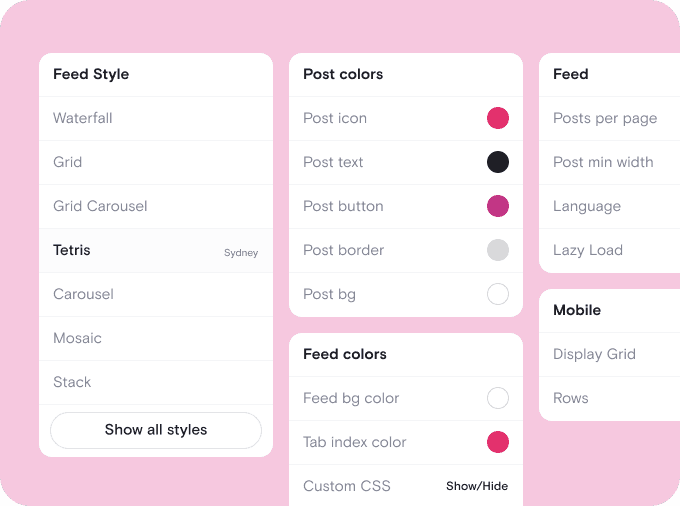
Style your feed to match your WordPress theme
Pick a template and adjust colors, spacing, and layout until your feed looks like it was built into your theme from the start. Whatever theme you're running, your Instagram content will feel native instead of bolted on.
Style your feed to match your WordPress theme
Pick a template and adjust colors, spacing, and layout until your feed looks like it was built into your theme from the start. Whatever theme you're running, your Instagram content will feel native instead of bolted on.

Place it in a widget area, a page, or a post
Add your feed to a WordPress widget area, drop it into a page with the block editor, or embed it inside a blog post. One feed, endless placement options, all without editing your theme's files.
Place it in a widget area, a page, or a post
Add your feed to a WordPress widget area, drop it into a page with the block editor, or embed it inside a blog post. One feed, endless placement options, all without editing your theme's files.

We chose Curator based on their highly competitive pricing and incredible interface. Not only that, their team gave 110% in helping craft the solution for our project.
Steve Crombie
CEO, Totem

Curator is a wonderfully easy tool to use, with a clear and intuitive interface. The pricing is extremely competitive and the customer service second to none!
Karen Murphy
Public Relations Manager, Unstudio

We've been working Curator.io for a some time now to be integrated into our social wall solution offering. The team's been cooperative and responsive to deal with.
Mike Vasavada
Director, Mobiddiction
We chose Curator based on their highly competitive pricing and incredible interface. Not only that, their team gave 110% in helping craft the solution for our project.
Steve Crombie
CEO, Totem
Curator is a wonderfully easy tool to use, with a clear and intuitive interface. The pricing is extremely competitive and the customer service second to none!
Karen Murphy
Public Relations Manager, Unstudio
We've been working Curator.io for a some time now to be integrated into our social wall solution offering. The team's been cooperative and responsive to deal with.
Mike Vasavada
Director, Mobiddiction
We chose Curator based on their highly competitive pricing and incredible interface. Not only that, their team gave 110% in helping craft the solution for our project.
Steve Crombie
CEO, Totem
Curator is a wonderfully easy tool to use, with a clear and intuitive interface. The pricing is extremely competitive and the customer service second to none!
Karen Murphy
Public Relations Manager, Unstudio
We've been working Curator.io for a some time now to be integrated into our social wall solution offering. The team's been cooperative and responsive to deal with.
Mike Vasavada
Director, Mobiddiction
Everything you need for a smooth WordPress setup
" transform="translate(18 5.6)" width="5.600000000000001px"/><path d="M 0 0 L 6 0" fill="transparent" height="1px" id="T0wHFjJDe" stroke-dasharray="" stroke-linecap="round" stroke-linejoin="round" stroke-width="0.8" stroke="rgb(0, 0, 0)" transform="translate(8 9.6)" width="6.000000000000002px"/><path d="M 0 0 L 9.2 0" fill="transparent" height="1px" id="Ol09ewnGg" stroke-dasharray="" stroke-linecap="round" stroke-linejoin="round" stroke-width="0.8" stroke="rgb(0, 0, 0)" transform="translate(8 12)" width="9.200000000000003px"/><path d="M 0 0 L 4.4 0" fill="transparent" height="1px" id="oCKj_Yy3Y" stroke-dasharray="" stroke-linecap="round" stroke-linejoin="round" stroke-width="0.8" stroke="rgb(0, 0, 0)" transform="translate(8 14.4)" width="4.400000000000002px"/><path d="M 5.598 12.8 L 0.129 6.744 C 0.088 6.699 0.056 6.646 0.033 6.587 C 0.011 6.528 0 6.465 0 6.401 C 0 6.337 0.011 6.274 0.033 6.215 C 0.056 6.156 0.088 6.103 0.129 6.058 L 5.6 0" fill="transparent" height="12.8px" id="nxYC8VJH4" stroke-dasharray="" stroke-linecap="round" stroke-linejoin="round" stroke-width="0.8" stroke="rgb(0, 0, 0)" transform="translate(0.4 5.6)" width="5.59999600000001px"/></svg>)
Official WordPress plugin
Install our plugin straight from the WordPress directory and manage your feed from inside your dashboard, no external tools required.
Official WordPress plugin
Install our plugin straight from the WordPress directory and manage your feed from inside your dashboard, no external tools required.
Works with the block editor
Add your feed as a native Gutenberg block, so it fits right into how you already build pages and posts.
Works with the block editor
Add your feed as a native Gutenberg block, so it fits right into how you already build pages and posts.
Compatible with popular page builders
Drop your feed into Elementor, Divi, or Beaver Builder using the same shortcode, no extra plugins or workarounds needed.
Compatible with popular page builders
Drop your feed into Elementor, Divi, or Beaver Builder using the same shortcode, no extra plugins or workarounds needed.
" height="16px" id="sbybzKMua" transform="translate(0 5)" width="24px"/></svg>)
Add to any widget area
Place your feed in your sidebar, footer, or any widget-ready area using WordPress's built-in widget tools.
Add to any widget area
Place your feed in your sidebar, footer, or any widget-ready area using WordPress's built-in widget tools.
" transform="translate(8.198 11.614)" width="7.563665454545447px"/><path d="M 0 0 L 0 1.513" fill="transparent" height="1.5127287272727274px" id="aklwAr9zB" stroke-dasharray="" stroke-linecap="round" stroke-linejoin="round" stroke-width="0.87" stroke="rgb(0, 0, 0)" transform="translate(9.711 7.053)" width="1px"/><path d="M 0 0 L 0 1.513" fill="transparent" height="1.5127287272727274px" id="IuTaE4o2w" stroke-dasharray="" stroke-linecap="round" stroke-linejoin="round" stroke-width="0.87" stroke="rgb(0, 0, 0)" transform="translate(14.249 7.053)" width="1px"/><path d="M 0 11.345 L 0 1.745 C 0 0.78 0.666 0 1.491 0 L 16.4 0 C 17.215 0 17.891 0.78 17.891 1.745 L 17.891 11.345" fill="transparent" height="11.345454545454547px" id="UItXlsDuW" stroke-dasharray="" stroke-linecap="round" stroke-linejoin="round" stroke-width="0.87" stroke="rgb(0, 0, 0)" transform="translate(3.055 3.271)" width="17.89090909090909px"/><path d="M 0 0 C 0 2.088 1.684 3.782 3.782 3.782 L 18.909 3.782 C 20.997 3.782 22.691 2.088 22.691 0 Z" fill="transparent" height="3.781832727272729px" id="z7pod4CVY" stroke-dasharray="" stroke-linecap="round" stroke-linejoin="round" stroke-width="0.87" stroke="rgb(0, 0, 0)" transform="translate(0.635 16.566)" width="22.69091345454544px"/></svg>)
Optimized for WordPress performance
Lightweight, cached-friendly code keeps your Instagram feed from slowing down page load times or hurting your site speed.
Optimized for WordPress performance
Lightweight, cached-friendly code keeps your Instagram feed from slowing down page load times or hurting your site speed.
" height="23px" id="DSGUr9xQb" transform="translate(0.5 0)" width="23px"/></svg>)
No theme or plugin conflicts
Built to play well with popular WordPress themes and caching plugins, so your feed just works without extra troubleshooting.
No theme or plugin conflicts
Built to play well with popular WordPress themes and caching plugins, so your feed just works without extra troubleshooting.
Questions? We got answers!
How do I embed an Instagram feed in WordPress?
Install the free Curator plugin from the WordPress directory, connect your Instagram account, and paste the generated shortcode into any page, post, or widget area. Your feed will appear automatically and keep updating as you post new content.

How do I embed an Instagram feed in WordPress?
Install the free Curator plugin from the WordPress directory, connect your Instagram account, and paste the generated shortcode into any page, post, or widget area. Your feed will appear automatically and keep updating as you post new content.
Do I need a plugin to add Instagram to WordPress?
No, but it makes things easier. You can also copy an HTML embed code into a Custom HTML block if you'd rather skip the plugin. Either way works, though the plugin lets you use short code instead of long code.
Do I need a plugin to add Instagram to WordPress?
No, but it makes things easier. You can also copy an HTML embed code into a Custom HTML block if you'd rather skip the plugin. Either way works, though the plugin lets you use short code instead of long code.
Will an Instagram feed slow down my WordPress site?
No. The embed code is lightweight and built to load quickly, so it won't drag down your page speed. It's also designed to work well alongside common WordPress caching plugins.
Will an Instagram feed slow down my WordPress site?
No. The embed code is lightweight and built to load quickly, so it won't drag down your page speed. It's also designed to work well alongside common WordPress caching plugins.
Can I add the feed to my WordPress sidebar or footer?
Yes. Once you have your shortcode or embed code, you can paste it into any widget area, including your sidebar or footer, using WordPress's standard widget tools.
Can I add the feed to my WordPress sidebar or footer?
Yes. Once you have your shortcode or embed code, you can paste it into any widget area, including your sidebar or footer, using WordPress's standard widget tools.
Does this work with Elementor, Divi, or other page builders?
Yes. The same shortcode works inside Elementor, Divi, Beaver Builder, and most other popular WordPress page builders, so you don't need a separate integration for each one.
Does this work with Elementor, Divi, or other page builders?
Yes. The same shortcode works inside Elementor, Divi, Beaver Builder, and most other popular WordPress page builders, so you don't need a separate integration for each one.
Can I moderate what Instagram content shows up on my site?
Yes. You can manually approve every post before it publishes or set moderation rules to filter out unwanted content automatically, giving you full control over what appears on your WordPress site.
Can I moderate what Instagram content shows up on my site?
Yes. You can manually approve every post before it publishes or set moderation rules to filter out unwanted content automatically, giving you full control over what appears on your WordPress site.
Is there a free way to embed Instagram on WordPress?
Yes. You can get started with Curator’s free plan that includes the WordPress plugin, auto-updating feeds, and basic customization, so you can test it out before committing to anything paid.
Is there a free way to embed Instagram on WordPress?
Yes. You can get started with Curator’s free plan that includes the WordPress plugin, auto-updating feeds, and basic customization, so you can test it out before committing to anything paid.
Will my Instagram feed update automatically on WordPress?
Yes. Once connected, your feed pulls in new posts automatically based on your approval settings, so your WordPress site stays current without you having to log in and update anything manually. If you’d prefer, you can turn off automatic approval and manually moderate your posts instead.
Will my Instagram feed update automatically on WordPress?
Yes. Once connected, your feed pulls in new posts automatically based on your approval settings, so your WordPress site stays current without you having to log in and update anything manually. If you’d prefer, you can turn off automatic approval and manually moderate your posts instead.
Built with an official WordPress plugin
Most embed tools hand you a code snippet and call it done. Curator gives you a dedicated WordPress plugin, so setup and management happen right from your dashboard.
Trusted on 100,000+ websites
From small blogs to large ecommerce stores, Curator powers Instagram feeds on thousands of websites worldwide, including thousands of WordPress installs.
No developer required
Whether you're using the block editor, a page builder, or a classic widget area, adding your feed takes minutes and never requires custom code.
Built with an official WordPress plugin
Most embed tools hand you a code snippet and call it done. Curator gives you a dedicated WordPress plugin, so setup and management happen right from your dashboard.
Trusted on 100,000+ websites
From small blogs to large ecommerce stores, Curator powers Instagram feeds on thousands of websites worldwide, including thousands of WordPress installs.
No developer required
Whether you're using the block editor, a page builder, or a classic widget area, adding your feed takes minutes and never requires custom code.
Built with an official WordPress plugin
Most embed tools hand you a code snippet and call it done. Curator gives you a dedicated WordPress plugin, so setup and management happen right from your dashboard.
Trusted on 100,000+ websites
From small blogs to large ecommerce stores, Curator powers Instagram feeds on thousands of websites worldwide, including thousands of WordPress installs.
No developer required
Whether you're using the block editor, a page builder, or a classic widget area, adding your feed takes minutes and never requires custom code.
Add a live Instagram feed to your website in minutes
Install the plugin, paste your shortcode, and moderate your way.