Reddit is one of the largest and most active platforms on the internet, with communities covering virtually every topic imaginable. Featuring user-generated discussions, breaking news, product recommendations, and in-depth insights, Reddit content offers real-time value for a wide range of audiences.
Embedding a Reddit widget on your website is an effective way to enhance engagement, add fresh and relevant content, and showcase authentic conversations from trusted sources. Whether highlighting trending posts from a specific subreddit or pulling in mentions of your brand, Reddit feeds help build credibility and keep visitors on your site longer.
With Curator, adding a Reddit widget takes just a few minutes. The platform requires no coding and allows full control over styling, moderation, and layout, making it easy to integrate Reddit content seamlessly into your website.
This guide provides a step-by-step walkthrough for embedding Reddit widgets using Curator, highlights common use cases, and reviews the top tools available. It also includes platform-specific embed instructions and answers to frequently asked questions.
Start using Reddit to enrich your site’s content and user experience.
What is a Reddit widget?
A Reddit widget is a tool that allows website owners to display Reddit content directly on their site. This content can include posts from specific subreddits, individual threads, or user comments, and can be embedded either as a single static element or as a dynamic feed that updates automatically.
Static embeds are typically used to showcase a single post or discussion and remain unchanged unless manually updated. In contrast, dynamic Reddit widgets—like those created with Curator—automatically pull in the latest content from your selected subreddit or thread. This makes it easy to keep your website current without extra effort.
Reddit widgets are especially useful for websites that want to highlight real-time community discussions, industry trends, or relevant user-generated content. They can also be styled to match your brand and placed anywhere on your site—from the homepage to blog sidebars or landing pages.
Common use cases include:
Tech blogs displaying live posts from r/technology
Gaming sites showcasing highlights from r/gaming
Ecommerce brands sharing customer feedback from Reddit
Publishers curating real-time discussions from topical subreddits
Whether you’re looking to build trust, increase time on site, or simply add dynamic content that resonates with your audience, Reddit widgets offer a practical and flexible solution.
How to add a Reddit widget using Curator (Step-by-step tutorial)
Adding a Reddit widget to your website with Curator is a straightforward process that requires no coding. In just a few minutes, you can create a live, auto-updating Reddit feed, customize how it looks, and embed it on your site using a simple HTML snippet.
This step-by-step walkthrough shows exactly how to set up a Reddit widget using Curator, from creating your feed to publishing it live on your website.
Step 1: Create a new feed
After logging into your Curator dashboard, the first step is to create a new feed.
Click the “Create New Feed” button at the top of the dashboard. You’ll then be prompted to give your feed a name. This name is only used internally, so you can choose something descriptive like “Reddit Feed,” “Community Discussions,” or “Subreddit Highlights.”
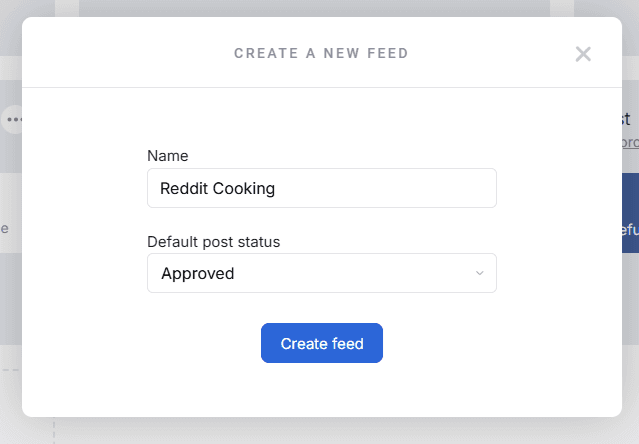
Once you’ve named the feed, click Create to move on to the next step.
Step 2: Choose your approval method
Next, decide how you want posts to appear on your website—automatically or manually.
Curator gives you two options:
Auto-approve – Posts are published to your site as soon as they’re pulled in
Manual approval – You review each post before it goes live
Choosing the right option depends on where your content is coming from and how much control you want. Auto-approval works well for feeds you trust, such as posts from your own Reddit account or a tightly moderated subreddit. Manual approval is a better choice when pulling content from external subreddits, where you may want to filter posts based on relevance, tone, or quality before publishing them.
Once you’ve selected your preferred approval method, click Next to continue.
Step 3: Add Reddit as a source
Now it’s time to connect Reddit to your feed.
Click “Add Source”, then select Reddit from the list of available platforms. You’ll be asked to integrate your Reddit account, which is required regardless of whether you’re pulling content from a user profile or a subreddit.
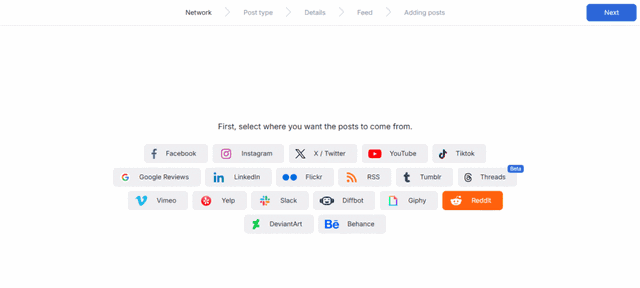
After connecting your account, choose how you want to source your content:
Posts from a specific subreddit, such as r/technology or r/startups
Posts from a specific Reddit user
If you want to pull posts from a subreddit, make sure to enter the subreddit name in the setup field. Even though the Reddit account integration is required either way, Curator will only pull subreddit content if the subreddit details are provided. Otherwise, the feed will pull content from your connected account.
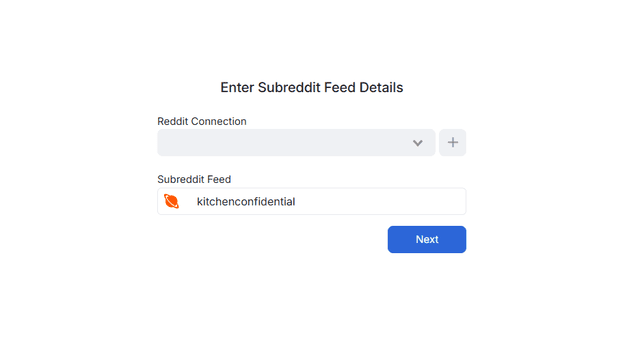
Once everything is set, Curator will begin pulling in posts and converting them into a live, updating feed.
Step 4: Curate posts
If you selected manual approval earlier, this step gives you full control over which Reddit posts appear on your website.
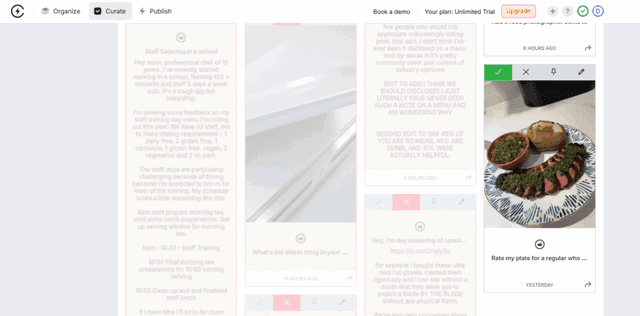
Curator displays all incoming posts in a simple moderation view. From here, you can review each post and decide whether to approve or deny it. This makes it easy to ensure the content aligns with your brand, audience, and content standards.
You can also curate based on specific criteria, such as allowing only posts that include images, focus on a particular topic, or meet a certain quality threshold. This is especially useful if you’re embedding content from busy or fast-moving subreddits where not every post is relevant.
Step 5: Style your Reddit widget
Once your content is curated, you can customize how your Reddit widget looks on your website.
Curator offers several layout templates to choose from, including list, grid, carousel, and waterfall layouts. If your goal is to showcase longer text-based discussions, the Waterfall layout works well. If you’re highlighting visual content like images or memes, a Grid layout may be a better fit.
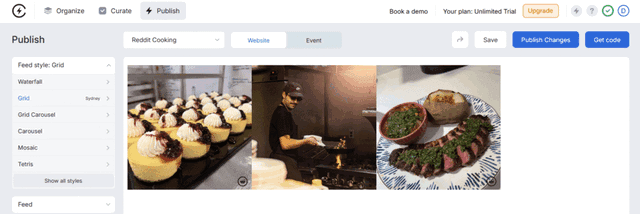
Beyond layout, you can customize key design elements such as colors, fonts, spacing, and borders. These options allow you to match the widget to your website’s branding so it feels like a natural part of the page rather than a third-party add-on.
Step 6: Publish and embed the widget
When you’re happy with how your Reddit widget looks, the final step is to publish and embed it on your website.
Click “Publish”, then select “Get Code” to generate your embed code. Curator provides a lightweight HTML snippet that can be pasted directly into your website.
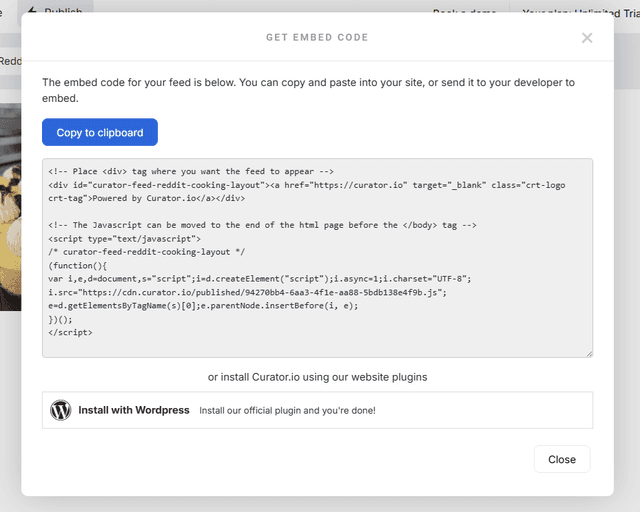
You can add this code using an HTML block, custom code section, or embed element, depending on your website builder. Once the page is published, your Reddit widget will appear live and continue updating automatically as new posts are added.
Embed tips for popular website builders
Once your Reddit widget is ready in Curator, embedding it into your website is quick and simple. Curator provides a lightweight HTML embed code that works across nearly every major website builder. Here’s how to add your Reddit feed to the most common platforms.
WordPress
WordPress makes it easy to embed custom HTML content almost anywhere on your site. After copying your Reddit widget code from Curator, follow these steps:
Navigate to the page, post, or widget area where you want the feed to appear.
Add a Custom HTML block using the WordPress editor or widget panel.
Paste the Curator embed code into the block.
Save and update the page to publish the widget.
This method works well for displaying your Reddit feed in blog posts, footers, or sidebars. If you’re using a theme with widget-ready areas, you can also paste the code into a sidebar or homepage section for more visibility.
Wix
Wix users can embed the Reddit widget using the built-in HTML element. Here’s how:
Go to your Wix dashboard and open the site editor.
Select the section where you want to add the feed.
Click “+” → Embed → Embed HTML to add a custom code box.
Paste the Curator embed code into the box and click Apply.
Resize or reposition the widget as needed.
Wix allows flexible placement of embeds, so you can easily drop your Reddit feed into a homepage, landing page, or blog layout.
Squarespace
Squarespace supports custom embeds through its Code Block feature. To add your Reddit widget:
Edit the page or section where you want the feed to appear.
Click “+” to add a new content block, then choose Code.
Paste your Curator HTML embed code into the block.
Save and publish the page.
For best results, use the Code Block inside a section with enough width for the widget layout you selected (e.g. grid or waterfall). This helps the feed display cleanly without extra styling.
Webflow
Webflow users can add the Curator embed code using the platform’s native Embed component. Follow these steps:
In the Webflow Designer, open the page or template where you want the widget.
From the Elements panel, find the Embed component under Components.
Drag and drop the Embed element into your desired section or container.
Paste the HTML code from Curator into the Embed box.
Click Save & Close, then Publish your site to make the feed live.
Webflow fully supports Curator’s asynchronous, SEO-friendly script, so your Reddit widget will load efficiently on all devices.
Shopify
Shopify store owners can use the Curator embed code to display Reddit content in key areas of their storefront. To embed your feed:
Go to Online Store → Themes → Actions → Edit Code.
Open the appropriate file where you want the widget to appear, such as:
footer.liquid(to add it site-wide)product.liquidorcollection.liquid(for product- or category-specific widgets)
Paste the Curator embed code where you want the widget to load.
Save your changes and preview the site.
Reddit widgets work especially well on Shopify product pages, where you can highlight community reviews, discussions, or user-generated content related to your brand.
Once embedded, your Reddit feed will automatically stay up to date with the latest posts, with no need for manual updates. Whether you’re using WordPress, Wix, Squarespace, Webflow, or Shopify, Curator makes it easy to bring dynamic Reddit content to your site.
Best Reddit widget tools
Use short feature blocks with logos or tool icons if possible. Match the tone/structure used in the RSS post.
1. Curator
Curator is a powerful yet easy-to-use content aggregator that lets you collect and display Reddit content alongside social media posts, reviews, and other user-generated content. You can use Curator to pull in posts from subreddits or Reddit users and display them as a clean, customizable widget on your website in minutes.
Curator is ideal if you want flexibility. You can mix Reddit with other content sources in a single feed or use Reddit on its own. Everything is fully customizable, mobile-friendly, and designed to work seamlessly with any website builder.
Top features:
connect Reddit, social media, RSS, and review sources
combine multiple sources into a single feed or use Reddit only
manual approval and moderation workflows
multiple feed templates including grid, list, carousel, and waterfall
full control over colors, fonts, spacing, and layout
lightweight, SEO-friendly embed code
unlimited admin users
works with all major website builders
Pricing:
Curator offers a generous free plan that includes up to 3 sources (Reddit included), 2,000 views per month, and unlimited admin users. Paid plans start at $25/month and include additional sources, faster update times, and advanced features like API access and post editing.
2. EmbedSocial

EmbedSocial is a user-generated content (UGC) platform that lets you create and embed dynamic social proof widgets—including Reddit feeds—across any website. It’s known for its versatility, offering support for dozens of platforms like Instagram, TikTok, Google Reviews, and Reddit, along with advanced tools for moderation, styling, and shoppable links.
Designed for marketers, agencies, and ecommerce brands, EmbedSocial allows you to build branded widgets from templates, sync live social media content, and control what appears through filters or manual selection. With no coding required, you can quickly launch Reddit widgets that update automatically and look great on any device.
Top features:
connect Reddit, social media, and reviews in a single platform
AI tools for styling, filtering, and widget generation
shoppable widgets with product tagging
auto-sync content every 30 minutes to 24 hours
responsive, customizable templates
content rights management via DMs or comments
advanced analytics and moderation tools
works with WordPress, Shopify, Webflow, Wix, and more
Pricing:
EmbedSocial offers a free plan with 1 source, 5 widgets, and 2,000 monthly views. Paid plans start at $24/month (billed annually) for 3 sources and 5,000 views. Higher tiers unlock faster syncing, more sources, unlimited widgets, and advanced features like social listening, UGC rights management, and team collaboration. A 7-day free trial is available on all plans.
3. Elfsight

Elfsight is a no-code widget platform trusted by millions of users for its highly customizable and responsive website widgets. While its Reddit Feed widget is currently in development, it’s expected to follow the same powerful approach as Elfsight’s other social media tools—making it easy to embed Reddit content like posts and discussions on your website in just a few clicks.
With Elfsight, you can create beautifully designed widgets using pre-built layouts, customize every detail to match your branding, and display community-driven content without writing a single line of code. The platform supports all major CMS and website builders, and widgets are mobile-friendly by default.
Top features:
visual widget editor with drag-and-drop customization
6 layout options including grid, list, slider, and carousel
advanced styling with color palette generator
popup viewer to keep users on-site while browsing content
element toggles for showing/hiding post details (author, date, icons, etc.)
real-time preview while customizing
works with WordPress, Squarespace, Wix, Shopify, Webflow, and more
80+ other widgets available for reviews, social feeds, calendars, and more
Pricing:
Elfsight offers a free plan with 1 widget and 200 monthly views, suitable for basic use. Paid plans start at $5/month, unlocking more views, additional widgets, and full access to customization features. All plans support unlimited websites, and a free trial is available to test the platform before upgrading.
4. Common Ninja
Common Ninja is a no-code platform offering over 200 customizable widgets, including a responsive Reddit Feed widget that helps you display real-time Reddit posts on your website. Designed for ease of use and full creative control, the Reddit widget supports multiple layouts, filters, scroll animations, and design skins—making it easy to match your site’s look and feel.
The platform is ideal for marketers, bloggers, and developers looking to enhance content discovery, boost engagement, and add fresh community-driven insights to their site. You can also pair the Reddit widget with other Common Ninja tools, such as polls, sliders, or charts, for a richer web experience.
Top features:
responsive Reddit widget with auto-refresh functionality
multiple layout types including tabs, mixed, and infinite scroll
full design control with color, font, and spacing customization
pre-designed skins and RTL (right-to-left) support
character and date display settings
custom CSS and API access for developers
no-code editor with real-time preview
integrates with 200+ other Common Ninja widgets
works with WordPress, Wix, Webflow, Shopify, Squarespace, and more
Pricing:
Common Ninja offers a free plan that includes 1 widget and 200 monthly pageviews. Paid plans start at $7/month (billed annually), unlocking unlimited views, multiple projects, advanced integrations, and branding removal. Higher tiers offer support for custom domains, multi-language content, and extended collaboration. All plans include a 7-day money-back guarantee.
5. Tagembed

Tagembed is a dedicated social media aggregator that offers a powerful Reddit widget to help brands display authentic community conversations on their websites. With real-time updates, customizable layouts, and AI-powered moderation, Tagembed makes it easy to showcase trending Reddit posts, boost credibility, and keep your site fresh with minimal effort.
Whether you want to display customer praise, highlight niche subreddits, or bring together multiple feeds into one widget, Tagembed gives you the tools to do it—all without writing a single line of code.
Top features:
collect posts from multiple subreddits into one live Reddit widget
real-time syncing and auto-refresh for new posts, upvotes, and comments
AI-powered moderation to filter duplicates, profanity, or off-topic content
customization tools for colors, fonts, layout, and branding
responsive design that works on desktop, tablet, and mobile
advanced analytics to track clicks, impressions, and engagement
supports modern layouts like single post, slider, card, and gallery
seamless integration with WordPress, Wix, Shopify, Webflow, Squarespace, and more
Pricing:
Tagembed offers a free plan with 1 feed, 500 monthly views, and manual moderation. Paid plans start at $19/month and include more feeds, faster updates (as frequent as every 15 minutes), automatic moderation, higher post limits, and ad-free display. A 14-day free trial is available for all premium plans.
Frequently asked questions
Can I embed a specific Reddit post?
Yes. You can embed a specific Reddit post by copying the post URL and adding it as a source in Curator. The post will appear as a dynamic widget on your website and update automatically, without requiring any manual changes or ongoing maintenance.
Can I display an entire subreddit feed?
Yes. Curator allows you to display posts from an entire subreddit by entering the subreddit name or URL. Once connected, you can control how the feed looks, choose a layout, and moderate which posts appear before publishing them on your site.
Will the Reddit widget slow down my site?
No. Curator’s Reddit widget uses lightweight, asynchronous embed code that loads separately from the rest of your page. This ensures your website remains fast and responsive while still displaying live, auto-updating Reddit content.
Can I customize the design of the Reddit widget?
Yes. Curator provides full design control for your Reddit widget. You can choose from multiple templates, adjust colors, fonts, spacing, and layout settings, and add custom CSS if you need advanced styling or tighter brand alignment.
Does Curator offer a free Reddit widget?
Yes. Curator offers a free plan that includes up to three content sources, including Reddit, along with 2,000 monthly views and unlimited admin users. This plan allows you to create, customize, and embed a Reddit widget at no cost.
Can I filter posts or approve them manually?
Yes. Curator gives you full moderation control. You can choose to manually approve posts before they appear on your site or enable auto-approval for trusted sources, making it easy to maintain quality and relevance in your Reddit feed.
Embedding a Reddit widget is a simple way to bring fresh, community-driven content to your website while boosting engagement and trust.
Start using Curator today to create a fully customizable Reddit feed. It’s free and easy to use.
Previous post: